
Первый графический мод
В этом руководстве мы пройдём все этапы создания реального AS3-мода — в качестве примера будет повторён мод калькулятор бронепробития.
Этот мод повышает информативность игрового "светофора", отображая в прицеле информацию о текущем бронепробитии с учётом расстояния до цели, а также о приведённой броне танка в точке прицеливания.
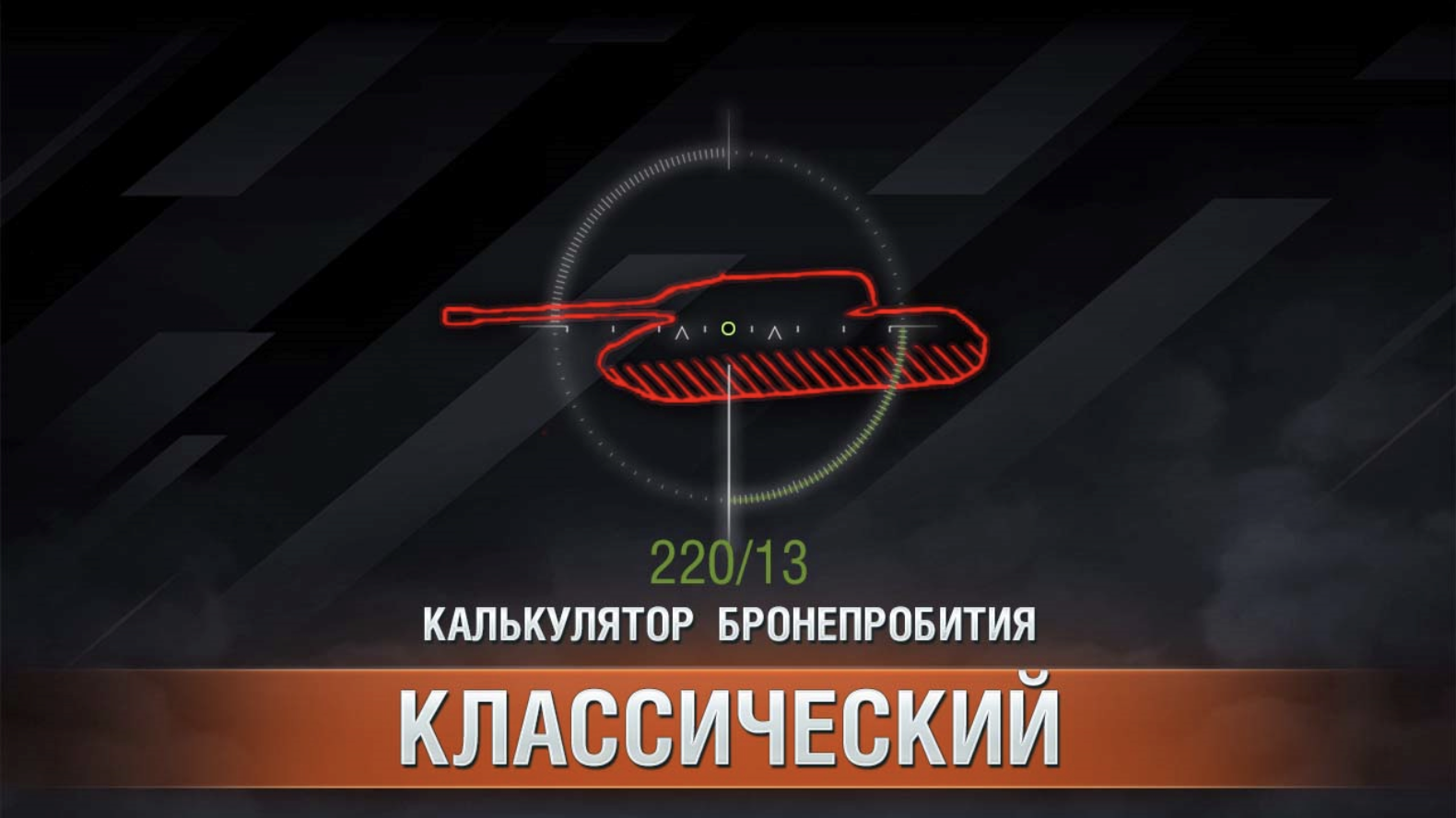
Мод является крайне полезным и не очень сложным в разработке, что делает его отличным примером для изучения.
Идея мода
Мод должен выводить в прицеле информацию о текущем бронепробитии с учётом расстояния до цели, а также о приведённой броне танка в точке, в которую вы целитесь.
Шаги для реализации
- Добавить на экран интерфейс вывода информации (текстовое поле в прицеле)
- В момент перемещения прицела определять, на какую цель он наведён и сколько брони в этой точке
Вычисление брони и пробития
Для тестирования функции вычисления брони вам потребуется запустить тренировочную комнату. Позовите друга или воспользуйтесь мультизапуском.
В «Мир Танков» уже существует механизм вычисления брони в точке прицеливания (цветовая индикация в прицеле о вероятности пробития). Нам нужно воспользоваться этим же механизмом. Реализовано это посредством класса _CrosshairShotResults.
В нём присутствуют функции:
_shouldRicochet— проверяет, отрикошетит ли снаряд от брониgetShotResult- вычисляет о вероятности пробития (низкая, средняя, высокая). В процессе определения вычисляется и искомая фактическая толщина брони.__shotResultModernHE– для осколочно-фугасных снарядов__shotResultDefault– для всех остальных типов снарядов
Нам потребуется реализовать похожий механизм, но в качестве результата вернуть значение приведённой брони, а не вероятность пробития.
За цветовую индикацию в прицеле отвечает класс ShotResultIndicatorPlugin, в нём можно подсмотреть в какой момент происходит перерасчёт маркера.
from skeletons.gui.battle_session import IBattleSessionProvider
from helpers import dependency
...
sessionProvider = dependency.descriptor(IBattleSessionProvider)

def start(self):
  ...
  ctrl = self.sessionProvider.shared.crosshair
  ctrl.onGunMarkerStateChanged += self.__onGunMarkerStateChanged

def __onGunMarkerStateChanged(self, markerType, position, direction, collision):
  ...
Отсюда мы видим, что необходимо подписаться на событие onGunMarkerStateChanged из IBattleSessionProvider.shared.crosshair.
Тестирование через PjOrion
Во время тестов мы будем часто менять код обработчика события, если каждый раз подписываться заново, то будет накапливаться всё больше и больше подписок, что приведёт к множественному срабатыванию обработчика.
Если просто заменять функцию без повторной подписки, то вызываться будет старая функция, а не новая, это можно обойти создав обёртку (wrapper):
from skeletons.gui.battle_session import IBattleSessionProvider
from helpers import dependency

sessionProvider = dependency.instance(IBattleSessionProvider) # type: IBattleSessionProvider

def onGunMarkerStateChanged(markerType, hitPoint, direction, collision):
  print("onGunMarkerStateChanged", markerType, hitPoint, direction, collision)

def wrapper(*a, **k):
  onGunMarkerStateChanged(*a, **k)

sessionProvider.shared.crosshair.onGunMarkerStateChanged += wrapper
Запустите тренировочную комнату и в PjOrion выполните этот код. После этого закомментируйте строку с подпиской.
# sessionProvider.shared.crosshair.onGunMarkerStateChanged += wrapperТеперь вы можете изменить функцию onGunMarkerStateChanged и выполнять её в PjOrion, не боясь, что будет накапливаться количество подписок.
def onGunMarkerStateChanged(markerType, hitPoint, direction, collision):
  print("onGunMarkerStateChanged_new", markerType, hitPoint, direction, collision)
Вместо старой функции теперь будет вызываться новая.
Реализация вычислений
Создадим функцию computeResult(hitPoint, direction, collision), в которой будут выполняться все вычисления.
def computeResult(hitPoint, direction, collision):
  print("computeResult", hitPoint, direction, collision)

def onGunMarkerStateChanged(markerType, hitPoint, direction, collision):
  print("onGunMarkerStateChanged_new", markerType, hitPoint, direction, collision)
  computeResult(hitPoint, direction, collision)
Будем работать только с ней. Добавим базовые проверки и получим информацию о снаряде и игроке.
from Vehicle import Vehicle as VehicleEntity
from DestructibleEntity import DestructibleEntity

def computeResult(hitPoint, direction, collision):
  if not collision: return

  entity = collision.entity
  if not isinstance(entity, (VehicleEntity, DestructibleEntity)): return

  player = BigWorld.player()
  if player is None: return

  vDesc = player.getVehicleDescriptor()
  shell = vDesc.shot.shell
  shellKind = shell.kind
  ppDesc = vDesc.shot.piercingPower
  maxDist = vDesc.shot.maxDistance
  piercingPowerRandomization = shell.piercingPowerRandomization
  dist = (hitPoint - player.getOwnVehiclePosition()).length
Получим ссылку на _CrosshairShotResults и вызовем его методы для вычисления брони.
from AvatarInputHandler import gun_marker_ctrl
shotResultResolver = gun_marker_ctrl.createShotResultResolver()

def computeResult(hitPoint, direction, collision):
  ...
  # Актуальное пробитие на дистанции
  distPiercingPower = shotResultResolver._computePiercingPowerAtDist(ppDesc, dist, maxDist, 1)

  # Список всех столкновений с колиженом танка
  collisionsDetails = shotResultResolver._getAllCollisionDetails(hitPoint, direction, entity)
  if collisionsDetails is None: return
collisionsDetails это список всех EntityCollisionData на пути снаряда. В каждом из них есть информация о дистанции от референсной hitPoint, косинус угла попадания, типе брони и её толщине.
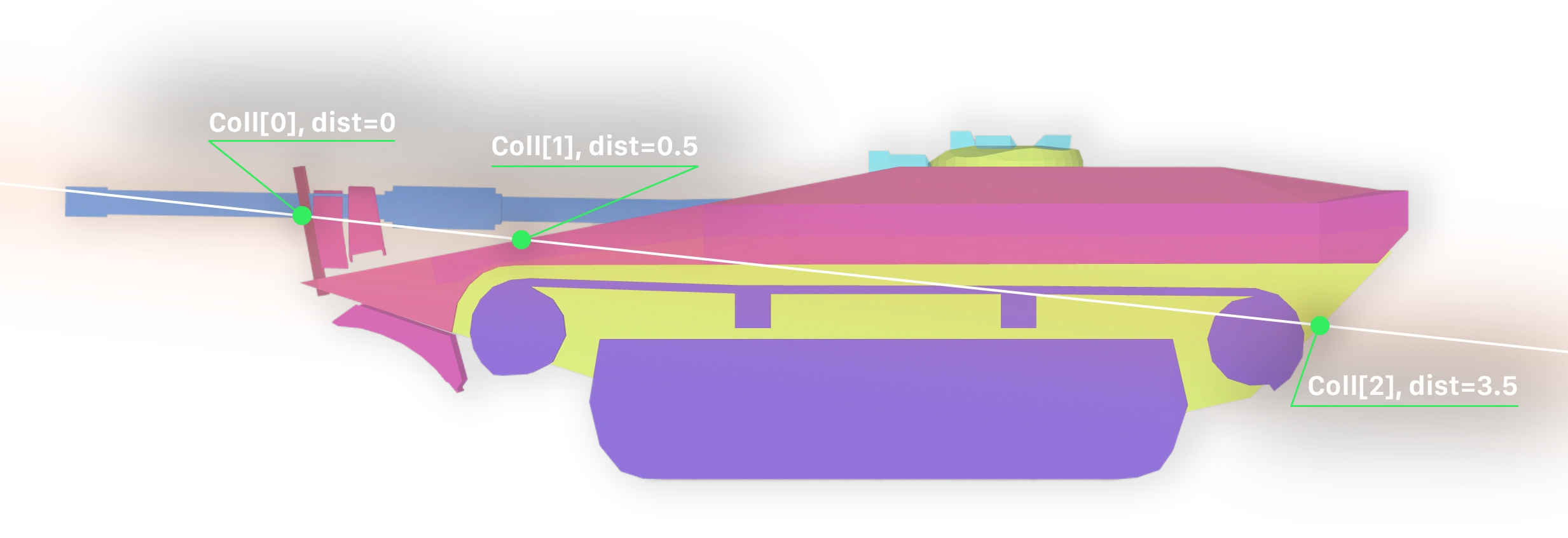
Причём в этом списке будет и входное, и выходное столкновение с бронёй танка, а так же все экраны на пути снаряда.
Сделаем функцию, которая будет вычислять суммарную приведённую броню до первого столкновения с танком (vehicleDamageFactor == 1). Дополнительно, на каждом шаге будет проверяться, не отрикошетит ли снаряд от брони.
Также не забудем учесть потери кумулятивной струи в воздухе (jetLoss).
После выхода из первого слоя брони, кумулятивная струя начинает терять 50% пробития за каждый метр
Кроме того, некоторые типы брони, учитываются только один раз, они помечены флагом collideOnceOnly, будем сохранять их в ignoredMaterials.
def computeTotalEffectiveArmor(hitPoint, collision, direction, shell):
  # type: (Math.Vector3, typing.Optional[EntityCollisionData], Math.Vector3, Shell) -> (float, Boolean)

  if collision is None: return (0.0, False, False, 0.0)

  entity = collision.entity
  collisionsDetails = shotResultResolver._getAllCollisionDetails(hitPoint, direction, entity) # type: typing.List[SegmentCollisionResultExt]
  if not collisionsDetails: return (0.0, False, False, 0.0)

  totalArmor = 0.0 # суммарная приведённая броня (в мм)
  ignoredMaterials = set()
  isRicochet = False # был ли рикошет
  hitArmor = False # было ли попадание в основную броню
  jetStartDist = None # дистанция начала потерь кумулятивной струи
  jetLoss = 0.0 # потери кумулятивной струи
  jetLossPPByDist = shotResultResolver._SHELL_EXTRA_DATA[shell.kind].jetLossPPByDist # сколько теряет кумулятивная струя в воздухе на метр

  for c in collisionsDetails:
    if not shotResultResolver._CrosshairShotResults__isDestructibleComponent(entity, c.compName): break

    material = c.matInfo # type: MaterialInfo
    if material is None or material.armor is None: continue

    key = (c.compName, material.kind)
    if key in ignoredMaterials: continue

    hitAngleCos = c.hitAngleCos if material.useHitAngle else 1.0
    totalArmor += shotResultResolver._computePenetrationArmor(shell, hitAngleCos, material)

    isRicochet |= shotResultResolver._shouldRicochet(shell, hitAngleCos, material)

    if material.collideOnceOnly: ignoredMaterials.add(key)
    if material.vehicleDamageFactor:
      # вычисляем потери кумулятивной струи в воздухе ПЕРЕД основным слоем
      if jetStartDist: jetLoss = (c.dist - jetStartDist) * jetLossPPByDist
      hitArmor = True
      break

    if jetStartDist is None and jetLossPPByDist > 0.0:
      jetStartDist = c.dist + material.armor * 0.001 # дистанция в метрах, а броня в мм – переводим

  return (float(totalArmor), isRicochet, hitArmor, jetLoss)
Вызовем эту функцию из computeResult и выведем результат в консоль.
def computeResult(hitPoint, direction, collision):
  ...
  totalArmor, isRicochet, hitArmor, jetLoss = computeTotalEffectiveArmor(hitPoint, collision, direction, shell)
  print("Result: dist=%.1f distPP=%.1f armor=%.1f ricochet=%s hitArmor=%s jetLoss=%.2f" % (
    dist, distPiercingPower, totalArmor, isRicochet, hitArmor, jetLoss
  ))
Весь код целиком
from AvatarInputHandler import gun_marker_ctrl
from Vehicle import Vehicle as VehicleEntity
from DestructibleEntity import DestructibleEntity

from skeletons.gui.battle_session import IBattleSessionProvider
from helpers import dependency

sessionProvider = dependency.instance(IBattleSessionProvider) # type: IBattleSessionProvider

shotResultResolver = gun_marker_ctrl.createShotResultResolver()

def computeTotalEffectiveArmor(hitPoint, collision, direction, shell):
  # type: (Math.Vector3, typing.Optional[EntityCollisionData], Math.Vector3, Shell) -> (float, Boolean)

  if collision is None: return (0.0, False)

  entity = collision.entity
  collisionsDetails = shotResultResolver._getAllCollisionDetails(hitPoint, direction, entity) # type: typing.List[SegmentCollisionResultExt]
  if not collisionsDetails: return (0.0, False)

  totalArmor = 0.0
  ignoredMaterials = set()
  isRicochet = False
  hitArmor = False
  jetStartDist = None
  jetLoss = 0.0
  jetLossPPByDist = shotResultResolver._SHELL_EXTRA_DATA[shell.kind].jetLossPPByDist # сколько теряет кумулятивная струя в воздухе на метр

  for c in collisionsDetails:
    if not shotResultResolver._CrosshairShotResults__isDestructibleComponent(entity, c.compName): break

    material = c.matInfo # type: MaterialInfo
    if material is None or material.armor is None: continue

    key = (c.compName, material.kind)
    if key in ignoredMaterials: continue

    hitAngleCos = c.hitAngleCos if material.useHitAngle else 1.0
    totalArmor += shotResultResolver._computePenetrationArmor(shell, hitAngleCos, material)

    isRicochet |= shotResultResolver._shouldRicochet(shell, hitAngleCos, material)
    hitArmor |= material.vehicleDamageFactor > 0

    if material.collideOnceOnly: ignoredMaterials.add(key)
    if material.vehicleDamageFactor:
      # вычисляем потери кумулятивной струи в воздухе ПЕРЕД основным слоем
      if jetStartDist: jetLoss = (c.dist - jetStartDist) * jetLossPPByDist
      break

    if jetStartDist is None and jetLossPPByDist > 0.0:
      jetStartDist = c.dist + material.armor * 0.001 # точка старта за бронёй

  return (float(totalArmor), isRicochet, hitArmor, jetLoss)

def computeResult(hitPoint, direction, collision):
  if not collision: return

  entity = collision.entity
  if not isinstance(entity, (VehicleEntity, DestructibleEntity)): return

  player = BigWorld.player()
  if player is None: return

  vDesc = player.getVehicleDescriptor()
  shell = vDesc.shot.shell
  shellKind = shell.kind
  ppDesc = vDesc.shot.piercingPower
  maxDist = vDesc.shot.maxDistance
  piercingPowerRandomization = shell.piercingPowerRandomization
  dist = (hitPoint - player.getOwnVehiclePosition()).length

  # Актуальное пробитие на дистанции
  distPiercingPower = shotResultResolver._computePiercingPowerAtDist(ppDesc, dist, maxDist, 1)

  # Список всех столкновений с колиженом танка
  collisionsDetails = shotResultResolver._getAllCollisionDetails(hitPoint, direction, entity)
  if collisionsDetails is None: return (distPiercingPower, None, None, None, None, None)

  totalArmor, isRicochet, hitArmor, jetLoss = computeTotalEffectiveArmor(hitPoint, collision, direction, shell)
  print("Result: dist=%.1f distPP=%.1f armor=%.1f ricochet=%s hitArmor=%s jetLoss=%.2f" % (
    dist, distPiercingPower, totalArmor, isRicochet, hitArmor, jetLoss
  ))

def onGunMarkerStateChanged(markerType, hitPoint, direction, collision):
  computeResult(hitPoint, direction, collision)

def wrapper(*a, **k):
  onGunMarkerStateChanged(*a, **k)

sessionProvider.shared.crosshair.onGunMarkerStateChanged += wrapper
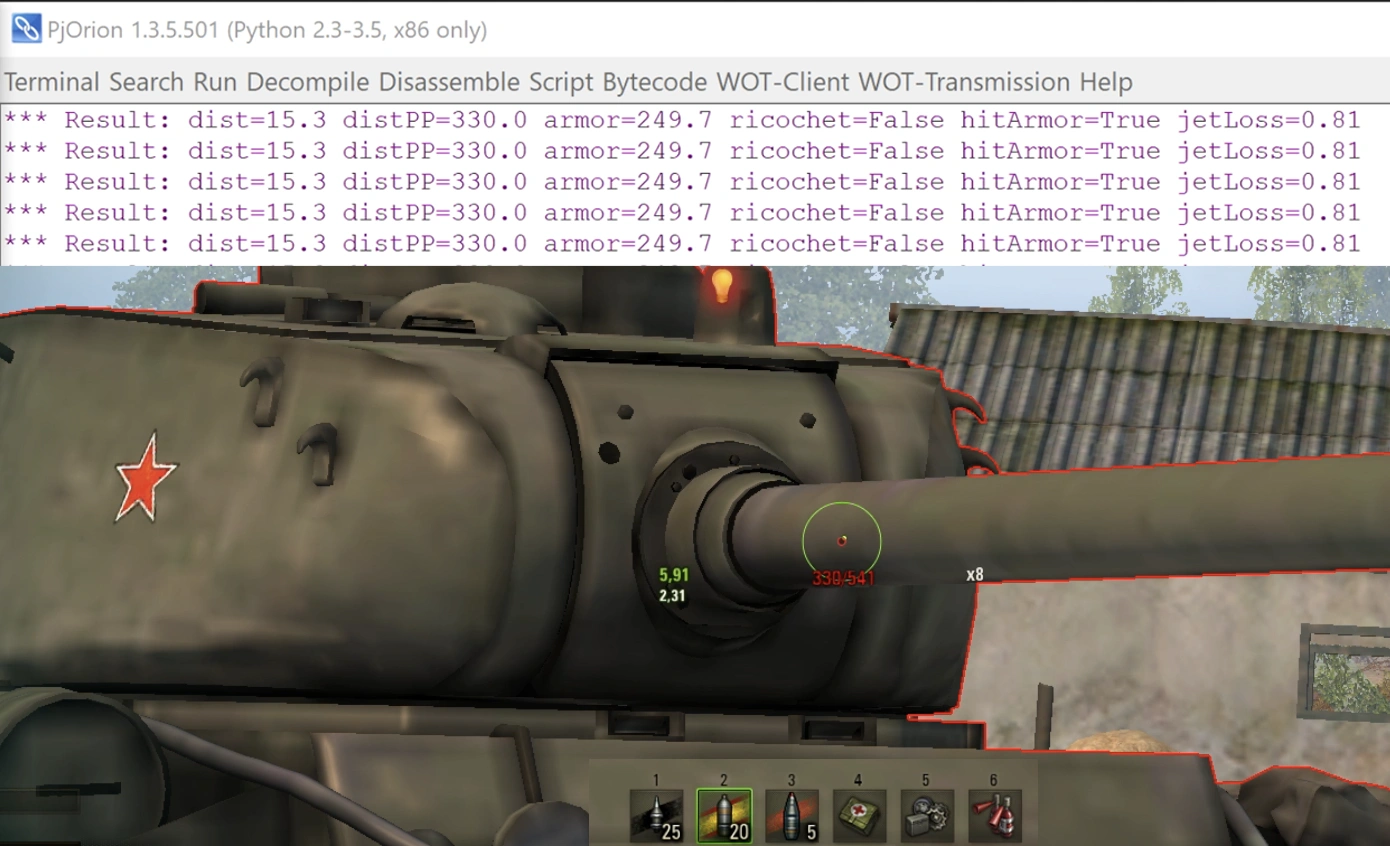
После запуска наведите прицел на танк и в консоли вы увидите вывод о пробитии, эффективной броне, рикошете, попадании по основной броне и потере кумулятивной струи.
Добавление интерфейса
Теперь, когда у нас есть вычисления, нужно вывести результат на экран. Будем делать на основе my.first_mod из обучения по настройке AS3-окружения.
Основная идея состоит в том, чтобы подключиться к игре в момент начала боя, найти в иерархии интерфейса BaseBattlePage и добавить туда наше View, которое будет отображать информацию.
Для начала просто добавим на экран полупрозрачный прямоугольник, чтобы понять, что всё работает. Для этого создайте в вашем проекте файл as3/src/my/first_mod/PiercingMainView.as
package my.first_mod {
  import flash.display.Sprite;
  import flash.display.DisplayObject;
  import net.wg.infrastructure.base.AbstractView;
  import net.wg.data.constants.generated.LAYER_NAMES;
  import net.wg.gui.components.containers.MainViewContainer;
  import net.wg.gui.battle.views.BaseBattlePage;
  import net.wg.infrastructure.interfaces.IView;

  public class PiercingMainView extends AbstractView {

    private var infoBox:Sprite = new Sprite();

    public function PiercingMainView() {
      super();

      // Закрашиваем прямоугольник 150x20 полупрозрачным зеленым цветом
      infoBox.graphics.beginFill(0x00FF00, 0.5);
      infoBox.graphics.drawRect(0, 0, 150, 20);
      infoBox.graphics.endFill();

      // Двигаем на центр экрана
      infoBox.x = App.appWidth * 0.5 - infoBox.width / 2;
      infoBox.y = App.appHeight * 0.55;
    }

    override protected function configUI():void {
      super.configUI();

      // Получаем основной контейнер игры
      var viewContainer:MainViewContainer = App.containerMgr.getContainer(
        LAYER_NAMES.LAYER_ORDER.indexOf(LAYER_NAMES.VIEWS)
      ) as MainViewContainer;

      // Перебираем все дочерние компоненты и ищем BaseBattlePage
      for (var i:int = 0; i < viewContainer.numChildren; i++) {
        var child:DisplayObject = viewContainer.getChildAt(i);
        if (child is BaseBattlePage) {

          // Нашли BaseBattlePage, добавляем в него наш прямоугольник
          (child as IView).addChild(infoBox);
        }
      }
    }
  }
}
Внимание!
Не забудьте отредактировать as3/build.bat, добавив строку для компиляции вашего нового файла PiercingMainView.as в my.first_mod.PiercingMainView.swf:
@echo off

rem ==== настройки ====
set "MXML_PATH=C:\apache-royale"

rem ==== компиляция ====
set "MXMLC=%MXML_PATH%\royale-asjs\bin\mxmlc"

call "%MXMLC%" -load-config+=build-config.xml --output=bin/my.first_mod.HelloWorldWindow.swf src/my/first_mod/HelloWorldWindow.as
call "%MXMLC%" -load-config+=build-config.xml --output=bin/my.first_mod.PiercingMainView.swf src/my/first_mod/PiercingMainView.as
После компиляции в as3/bin появится файл my.first_mod.PiercingMainView.swf.
Теперь создадим контролирующий Python-скрипт my_first_mod/PiercingMainView.py, который будет связан с SWF.
from frameworks.wulf import WindowLayer
from gui.Scaleform.framework.entities.View import View
from gui.Scaleform.framework import g_entitiesFactories, ScopeTemplates, ViewSettings
from gui.shared import events, EVENT_BUS_SCOPE, g_eventBus

MY_FIRST_MOD_PIERCING_MAIN_VIEW = "MY_FIRST_MOD_PIERCING_MAIN_VIEW"

class PiercingMainView(View):
  def __init__(self, *args, **kwargs):
    super(PiercingMainView, self).__init__(*args, **kwargs)

def setup():
  settingsViewSettings = ViewSettings(
    MY_FIRST_MOD_PIERCING_MAIN_VIEW,
    PiercingMainView,
    "my.first_mod.PiercingMainView.swf",
    WindowLayer.TOP_WINDOW,
    None,
    ScopeTemplates.VIEW_SCOPE,
  )
  g_entitiesFactories.addSettings(settingsViewSettings)

  def onAppInitialized(event):
    if event.ns == APP_NAME_SPACE.SF_BATTLE:
      app = ServicesLocator.appLoader.getApp(event.ns) # type: AppEntry
      app.loadView(SFViewLoadParams(MY_FIRST_MOD_PIERCING_MAIN_VIEW))

  g_eventBus.addListener(events.AppLifeCycleEvent.INITIALIZED, onAppInitialized, EVENT_BUS_SCOPE.GLOBAL)
В функции setup() мы подписываемся на событие инициализации Scaleform‑приложения, проверяем, что загруженное приложение — боевой интерфейс (SF_BATTLE), и загружаем наш PiercingMainView.swf.
Теперь в точке входа мода mod_myFirstMod.py нужно вызвать setup():
from .my_first_mod.PiercingMainView import setup as setupPiercingMainView

MOD_VERSION = '{{VERSION}}'

def init():
  setupPiercingMainView()
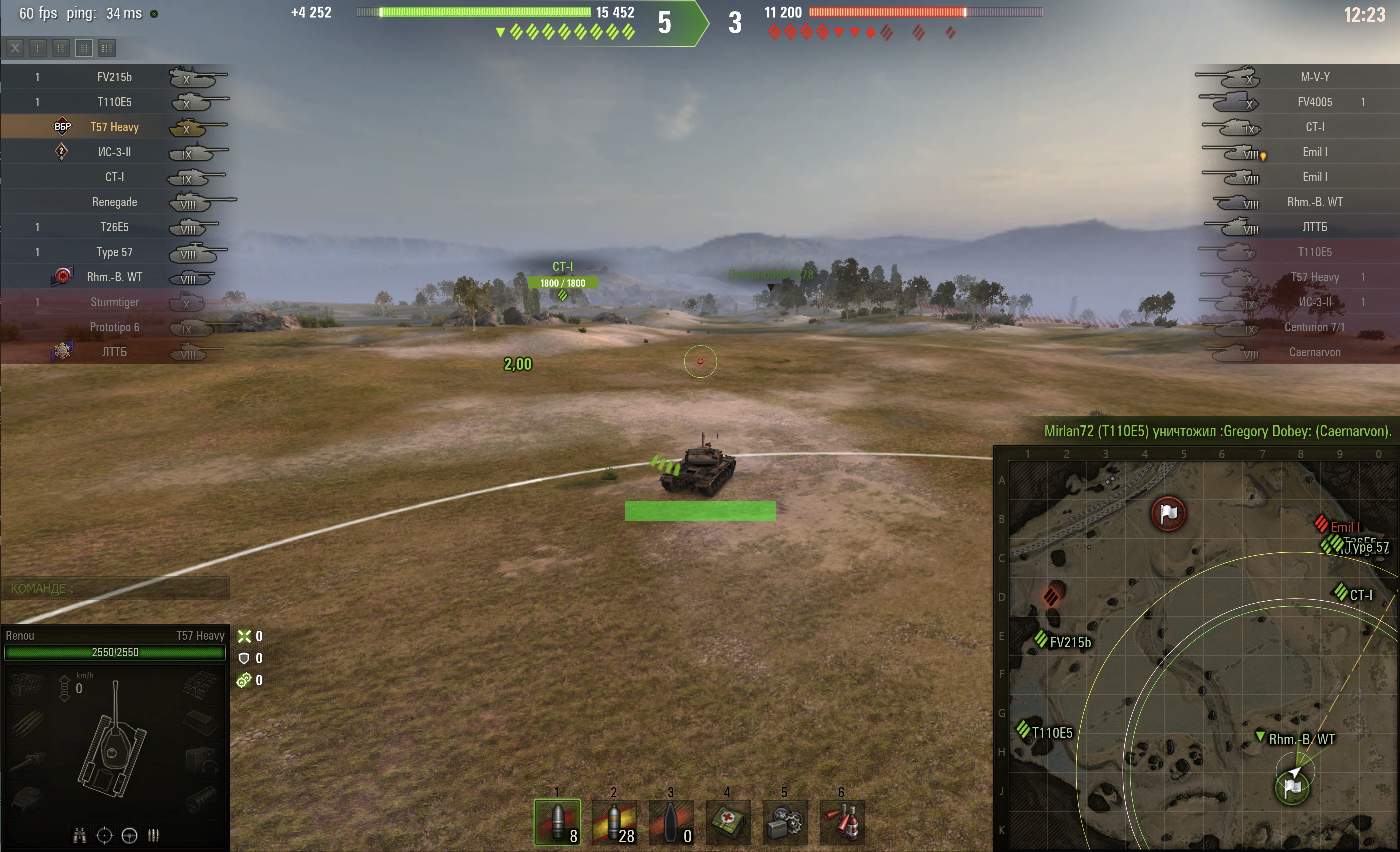
Теперь можно скомпилировать мод и запустить игру.
Внимание!
Проверяйте моды только в тренировочных комнатах, на тестовых серверах или в режиме "Полигон". Ошибки в модах могут привести к сбоям игры.
Результат
Вывод пробития в интерфейс
Теперь, когда у нас есть свой контейнер (зелёный прямоугольник) в общем интерфейсе боя, можно дочерним элементом добавить текстовое поле и выводить туда информацию о броне и пробитии.
Будем выводить в формате {актуальное пробитие}/{фактическая броня}. Цвет текста будет зависеть от вероятности пробития:
- Серый – на пути снаряда нет брони
- Фиолетовый – рикошет
- Ярко-красный – гарантированное непробитие
- Ярко-зелёный – гарантированное пробитие
- Градиент от мягко красного к мягко зелёному – вероятность пробития от 0% до 100%
Значение текстового поля и его цвет будут передаваться из контролирующего Python-скрипта в AS3 PiercingMainView.
Изменение AS3 кода
В PiercingMainView.as добавим инициализацию текстового поля и метод для обновления текста и его цвета.
Для текстового поля используем flash.text.TextField. Шрифт, размер, цвет и выравнивание настраиваются через TextFormat, а тень – через DropShadowFilter.
package my.first_mod {
  import flash.display.Sprite;
  import flash.display.DisplayObject;
  import net.wg.infrastructure.base.AbstractView;
  import net.wg.data.constants.generated.LAYER_NAMES;
  import net.wg.gui.components.containers.MainViewContainer;
  import net.wg.gui.battle.views.BaseBattlePage;
  import net.wg.infrastructure.interfaces.IView;
  import flash.text.TextField;
  import flash.text.TextFormat;
  import flash.filters.DropShadowFilter;
  import flash.text.TextFormatAlign;
  import flash.text.AntiAliasType;

  public class PiercingMainView extends AbstractView {

    private var infoBox:Sprite = new Sprite();
    private var infoText:TextField = new TextField();

    public function PiercingMainView() {
      super();

      // Закрашиваем прямоугольник (контейнер) 150x20 прозрачным цветом
      infoBox.graphics.beginFill(0, 0);
      infoBox.graphics.drawRect(0, 0, 150, 20);
      infoBox.graphics.endFill();

      // Двигаем на центр экрана
      infoBox.x = App.appWidth * 0.5 - infoBox.width / 2;
      infoBox.y = App.appHeight * 0.55;

      // Настраиваем текст
      var format:TextFormat = new TextFormat();
      format.size = 18;
      format.color = 0xFFFFFF;
      format.font = "$FieldFont";
      format.align = TextFormatAlign.CENTER;

      var filter:DropShadowFilter = new DropShadowFilter();
      filter.distance = 0;
      filter.angle = 0;
      filter.color = 0x000000;
      filter.alpha = 0.9;
      filter.blurX = filter.blurY = 2;
      filter.strength = 2;
      filter.quality = 10;

      infoText.selectable = false;
      infoText.mouseEnabled = false;
      infoText.antiAliasType = flash.text.AntiAliasType.ADVANCED;
      infoText.defaultTextFormat = format;
      infoText.setTextFormat(format);
      infoText.filters = [filter];

      // Добавляем текстовое поле в контейнер, и настраиваем его размер и позицию
      infoBox.addChild(infoText);
      infoText.width = infoBox.width;
      infoText.height = infoBox.height;
      infoText.x = 0;
      infoText.y = 0;
    }
  }
}
Если во время боя игрок изменит разрешение экрана, то наш прямоугольник и текст останутся на старых координатах. Чтобы вернуть их на центр экрана, нужно подписаться на событие изменения размера окна и обновлять позицию контейнера.
package my.first_mod {
  ...
  import flash.events.Event;

  public class PiercingMainView extends AbstractView {
    public function PiercingMainView() {
      super();
      ...
      App.stage.addEventListener(Event.RESIZE, onAppResize);
    }

    private function onAppResize(event:Event):void {
      infoBox.x = App.appWidth * 0.5 - infoBox.width / 2;
      infoBox.y = App.appHeight * 0.55;
    }
  }
}
Далее нужно объявить метод, который будет вызываться из Python-кода для обновления текста и его цвета.
package my.first_mod {
  ...
  public class PiercingMainView extends AbstractView {
    ...
    public function as_setText(value:String, color:uint):void {
      infoText.text = value;
      infoText.textColor = color;
    }
  }
}
Весь код PiercingMainView.as целиком
package my.first_mod {
  import flash.display.Sprite;
  import flash.display.DisplayObject;
  import net.wg.infrastructure.base.AbstractView;
  import net.wg.data.constants.generated.LAYER_NAMES;
  import net.wg.gui.components.containers.MainViewContainer;
  import net.wg.gui.battle.views.BaseBattlePage;
  import net.wg.infrastructure.interfaces.IView;
  import flash.text.TextField;
  import flash.text.TextFormat;
  import flash.filters.DropShadowFilter;
  import flash.text.TextFormatAlign;
  import flash.text.AntiAliasType;
  import flash.events.Event;

  public class PiercingMainView extends AbstractView {

    private var infoBox:Sprite = new Sprite();
    private var infoText:TextField = new TextField();

    public function PiercingMainView() {
      super();

      // Закрашиваем прямоугольник 150x20 полупрозрачным зеленым цветом
      infoBox.graphics.beginFill(0, 0);
      infoBox.graphics.drawRect(0, 0, 150, 20);
      infoBox.graphics.endFill();

      // Двигаем на центр экрана
      infoBox.x = App.appWidth * 0.5 - infoBox.width / 2;
      infoBox.y = App.appHeight * 0.55;

      // Настраиваем текст
      var format:TextFormat = new TextFormat();
      format.size = 18;
      format.color = 0xFFFFFF;
      format.font = "$FieldFont";
      format.align = TextFormatAlign.CENTER;

      var filter:DropShadowFilter = new DropShadowFilter();
      filter.distance = 0;
      filter.angle = 0;
      filter.color = 0x000000;
      filter.alpha = 0.9;
      filter.blurX = filter.blurY = 2;
      filter.strength = 2;
      filter.quality = 10;

      infoText.selectable = false;
      infoText.mouseEnabled = false;
      infoText.antiAliasType = flash.text.AntiAliasType.ADVANCED;
      infoText.defaultTextFormat = format;
      infoText.setTextFormat(format);
      infoText.filters = [filter];

      infoBox.addChild(infoText);
      infoText.width = infoBox.width;
      infoText.height = infoBox.height;
      infoText.x = 0;
      infoText.y = 0;

      App.instance.addEventListener(Event.RESIZE, onAppResize);

    }

    override protected function configUI():void {
      super.configUI();

      // Получаем основной контейнер игры
      var viewContainer:MainViewContainer = App.containerMgr.getContainer(
          LAYER_NAMES.LAYER_ORDER.indexOf(LAYER_NAMES.VIEWS)
        ) as MainViewContainer;

      // Перебираем все дочерние компоненты и ищем BaseBattlePage
      for (var i:int = 0; i < viewContainer.numChildren; i++) {
        var child:DisplayObject = viewContainer.getChildAt(i);
        if (child is BaseBattlePage) {

          // Нашли BaseBattlePage, добавляем в него наш прямоугольник
          (child as IView).addChild(infoBox);
        }
      }
    }

    public function as_setText(value:String, color:uint):void {
      infoText.text = value;
      infoText.textColor = color;
    }

    private function onAppResize(event:Event):void {
      infoBox.x = App.appWidth * 0.5 - infoBox.width / 2;
      infoBox.y = App.appHeight * 0.55;
    }
  }
}
Изменение Python кода
В my_first_mod/PiercingMainView.py добавим функцию обёртку над вызовом AS3 метода as_setText.
class PiercingMainView(View):
  ...
  def as_setText(self, text, color):
    self.flashObject.as_setText(text, color)
Объявим функцию для вычисления вероятности пробития (с учётом Гауссового распределения рандомизации пробития при σ=3)
Можете не вникать в код, это стандартная формула для нормального распределения с учётом ограниченного диапазона.
def penetrationProbability(piercing, totalArmor, piercingPowerRandomization):
  P0 = float(piercing)
  A  = float(totalArmor)
  x  = float(piercingPowerRandomization)

  # Допустимый диапазон пробития
  L = P0 * (1.0 - x)
  U = P0 * (1.0 + x)

  k = 3
  sigma = (x * P0) / k
  mu = P0

  # Быстрые случаи
  if A <= L: return 1.0
  if A >= U: return 0.0

  # Стандартная нормальная CDF через erf
  def Phi(z): return 0.5 * (1.0 + math.erf(z / math.sqrt(2.0)))

  zL = (L - mu) / sigma
  zU = (U - mu) / sigma
  zA = (A - mu) / sigma

  denom = Phi(zU) - Phi(zL)
  if denom <= 1e-15: return 1.0 if A <= mu else 0.0

  p = (Phi(zU) - Phi(zA)) / denom

  # Численная обрезка
  if p < 0.0: p = 0.0
  if p > 1.0: p = 1.0
  return p
Объявим константы цветов
RICOCHET_COLOR = 0xa85dfc
NOT_ARMOR_COLOR = 0xbbbbbb
GREEN_COLOR = 0x00FF00
RED_COLOR = 0xFF0000
SOFT_GREEN_COLOR = 0x48f32c
SOFT_RED_COLOR = 0xf32c2c
Перенесём в этот класс функции computeTotalEffectiveArmor, computeResult и onGunMarkerStateChanged из наших тестов в PjOrion.
...
class PiercingMainView(View):
  ...

  sessionProvider = dependency.descriptor(IBattleSessionProvider) # type: IBattleSessionProvider

  def __init__(self, *args, **kwargs):
    super(PiercingMainView, self).__init__(*args, **kwargs)
    self.shotResultResolver = gun_marker_ctrl.createShotResultResolver() # type: gun_marker_ctrl._CrosshairShotResults

  def computeTotalEffectiveArmor(self, hitPoint, collision, direction, shell):
    ...

  def computeResult(self, hitPoint, direction, collision):
    ...
    print("Result: dist=%.1f distPP=%.1f armor=%.1f ricochet=%s hitArmor=%s jetLoss=%.2f" % (
      dist, distPiercingPower, totalArmor, isRicochet, hitArmor, jetLoss
    ))

    return (distPiercingPower, totalArmor, isRicochet, hitArmor, jetLoss, piercingPowerRandomization)
Подпишемся на событие onGunMarkerStateChanged в __init__ и будем обновлять текст в этом методе
...
class PiercingMainView(View):
  ...
  def __init__(self, *args, **kwargs):
    ...
    self.sessionProvider.shared.crosshair.onGunMarkerStateChanged += self.onGunMarkerStateChanged

  def onGunMarkerStateChanged(self, markerType, hitPoint, direction, collision):
    result = self.computeResult(hitPoint, direction, collision)
    if result is None: return self.as_setText('', 0)

    piercing, totalArmor, isRicochet, hitArmor, jetLoss, piercingPowerRandomization = result

    if piercing is None: return self.as_setText('', 0)
    if totalArmor is None: return self.as_setText('%d/-' % round(piercing), GREEN_COLOR)

    # Уменьшаем пробитие на потери кумулятивной струи
    realPiercing = piercing * max(0, (1 - jetLoss))

    targetColor = GREEN_COLOR
    if isRicochet: targetColor = RICOCHET_COLOR
    elif not hitArmor: targetColor = NOT_ARMOR_COLOR
    elif realPiercing <= 0.0: targetColor = RED_COLOR
    elif totalArmor <= 0.0: targetColor = GREEN_COLOR
    else:
      prob = penetrationProbability(realPiercing, totalArmor, piercingPowerRandomization)
      if prob <= 0: targetColor = RED_COLOR
      elif prob >= 1: targetColor = GREEN_COLOR
      # Преобразование цвета от SOFT_RED_COLOR к SOFT_GREEN_COLOR в зависимости от вероятности пробития
      else:
        targetColor = lerpColor(
          SOFT_RED_COLOR,
          SOFT_GREEN_COLOR,
          prob,
          mid_L_shift=+10.0,
          mid_C_boost=1.15
        )

    self.as_setText('%d/%d' % (round(realPiercing), round(totalArmor)), targetColor)
Для работы плавного перехода цвета необходима функция lerpColor. Скачайте файл color.py и поместите его в папку my_first_mod. В этом файле объявлены функции для работы с цветами.
Импортируйте его в PiercingMainView.py:
from .color import lerpColor
...
Весь код my_first_mod/PiercingMainView.py целиком
import typing
import math
from ProjectileMover import EntityCollisionData
from frameworks.wulf import WindowLayer
from gui.Scaleform.framework.entities.View import View
from gui.Scaleform.framework import g_entitiesFactories, ScopeTemplates, ViewSettings
from gui.shared import events, EVENT_BUS_SCOPE, g_eventBus
from gui.app_loader.settings import APP_NAME_SPACE
from gui.Scaleform.framework.application import AppEntry
from gui.Scaleform.framework.managers.loaders import SFViewLoadParams
from gui.shared.personality import ServicesLocator
from items.components.shared_components import MaterialInfo
from AvatarInputHandler import gun_marker_ctrl
from Vehicle import Vehicle as VehicleEntity
from DestructibleEntity import DestructibleEntity
from skeletons.gui.battle_session import IBattleSessionProvider
from helpers import dependency

from .color import lerpColor

import BigWorld


MY_FIRST_MOD_PIERCING_MAIN_VIEW = "MY_FIRST_MOD_PIERCING_MAIN_VIEW"

RICOCHET_COLOR = 0xa85dfc
NOT_ARMOR_COLOR = 0xbbbbbb
GREEN_COLOR = 0x00FF00
SOFT_GREEN_COLOR = 0x48f32c
RED_COLOR = 0xFF0000
SOFT_RED_COLOR = 0xf32c2c

def penetrationProbability(piercing, totalArmor, piercingPowerRandomization):
  P0 = float(piercing)
  A  = float(totalArmor)
  x  = float(piercingPowerRandomization)

  # Границы клампа
  L = P0 * (1.0 - x)
  U = P0 * (1.0 + x)

  k = 3
  sigma = (x * P0) / k
  mu = P0

  # Быстрые случаи
  if A <= L: return 1.0
  if A >= U: return 0.0

  # Стандартная нормальная CDF через erf
  def Phi(z): return 0.5 * (1.0 + math.erf(z / math.sqrt(2.0)))

  zL = (L - mu) / sigma
  zU = (U - mu) / sigma
  zA = (A - mu) / sigma

  denom = Phi(zU) - Phi(zL)
  if denom <= 1e-15: return 1.0 if A <= mu else 0.0

  p = (Phi(zU) - Phi(zA)) / denom

  # Численная обрезка
  if p < 0.0: p = 0.0
  if p > 1.0: p = 1.0
  return p

class PiercingMainView(View):

  sessionProvider = dependency.descriptor(IBattleSessionProvider) # type: IBattleSessionProvider

  def __init__(self, *args, **kwargs):
    super(PiercingMainView, self).__init__(*args, **kwargs)
    self.shotResultResolver = gun_marker_ctrl.createShotResultResolver() # type: gun_marker_ctrl._CrosshairShotResults
    self.sessionProvider.shared.crosshair.onGunMarkerStateChanged += self.onGunMarkerStateChanged

  def computeTotalEffectiveArmor(self, hitPoint, collision, direction, shell):
    # type: (Math.Vector3, typing.Optional[EntityCollisionData], Math.Vector3, Shell) -> (float, Boolean)

    if collision is None: return (0.0, False)

    entity = collision.entity
    collisionsDetails = self.shotResultResolver._getAllCollisionDetails(hitPoint, direction, entity) # type: typing.List[SegmentCollisionResultExt]
    if not collisionsDetails: return (0.0, False)

    totalArmor = 0.0
    ignoredMaterials = set()
    isRicochet = False
    hitArmor = False
    jetStartDist = None
    jetLoss = 0.0
    jetLossPPByDist = self.shotResultResolver._SHELL_EXTRA_DATA[shell.kind].jetLossPPByDist # сколько теряет кумулятивная струя в воздухе на метр

    for c in collisionsDetails:
      if not self.shotResultResolver._CrosshairShotResults__isDestructibleComponent(entity, c.compName): break

      material = c.matInfo # type: MaterialInfo
      if material is None or material.armor is None: continue

      key = (c.compName, material.kind)
      if key in ignoredMaterials: continue

      hitAngleCos = c.hitAngleCos if material.useHitAngle else 1.0
      totalArmor += self.shotResultResolver._computePenetrationArmor(shell, hitAngleCos, material)

      isRicochet |= self.shotResultResolver._shouldRicochet(shell, hitAngleCos, material)
      hitArmor |= material.vehicleDamageFactor > 0

      if material.collideOnceOnly: ignoredMaterials.add(key)
      if material.vehicleDamageFactor:
        # вычисляем потери кумулятивной струи в воздухе ПЕРЕД основным слоем
        if jetStartDist: jetLoss = (c.dist - jetStartDist) * jetLossPPByDist
        break

      if jetStartDist is None and jetLossPPByDist > 0.0:
        jetStartDist = c.dist + material.armor * 0.001 # точка старта за бронёй

    return (float(totalArmor), isRicochet, hitArmor, jetLoss)

  def computeResult(self, hitPoint, direction, collision):
    if not collision: return None

    entity = collision.entity
    if not isinstance(entity, (VehicleEntity, DestructibleEntity)): return None

    player = BigWorld.player()
    if player is None: return None

    vDesc = player.getVehicleDescriptor()
    shell = vDesc.shot.shell
    ppDesc = vDesc.shot.piercingPower
    maxDist = vDesc.shot.maxDistance
    piercingPowerRandomization = shell.piercingPowerRandomization
    dist = (hitPoint - player.getOwnVehiclePosition()).length


    # Актуальное пробитие на дистанции
    distPiercingPower = self.shotResultResolver._computePiercingPowerAtDist(ppDesc, dist, maxDist, 1)

    # Список всех столкновений с колиженом танка
    collisionsDetails = self.shotResultResolver._getAllCollisionDetails(hitPoint, direction, entity)
    if collisionsDetails is None: return (distPiercingPower, None, None, None, None, None)

    totalArmor, isRicochet, hitArmor, jetLoss = self.computeTotalEffectiveArmor(hitPoint, collision, direction, shell)

    return (distPiercingPower, totalArmor, isRicochet, hitArmor, jetLoss, piercingPowerRandomization)

  def onGunMarkerStateChanged(self, markerType, hitPoint, direction, collision):
    result = self.computeResult(hitPoint, direction, collision)
    if result is None: return self.as_setText('', 0)

    piercing, totalArmor, isRicochet, hitArmor, jetLoss, piercingPowerRandomization = result

    if piercing is None: return self.as_setText('', 0)
    if totalArmor is None: return self.as_setText('%d/-' % round(piercing), GREEN_COLOR)

    realPiercing = piercing * max(0, (1 - jetLoss))

    targetColor = GREEN_COLOR
    if isRicochet: targetColor = RICOCHET_COLOR
    elif not hitArmor: targetColor = NOT_ARMOR_COLOR
    elif realPiercing <= 0.0: targetColor = RED_COLOR
    elif totalArmor <= 0.0: targetColor = GREEN_COLOR
    else:
      prob = penetrationProbability(realPiercing, totalArmor, piercingPowerRandomization)
      if prob <= 0: targetColor = RED_COLOR
      elif prob >= 1: targetColor = GREEN_COLOR
      else: targetColor = lerpColor(SOFT_RED_COLOR, SOFT_GREEN_COLOR, prob, mid_L_shift=+10.0, mid_C_boost=1.15)

    self.as_setText('%d/%d' % (round(realPiercing), round(totalArmor)), targetColor)

  def as_setText(self, text, color):
    self.flashObject.as_setText(text, color)

def setup():
  settingsViewSettings = ViewSettings(
    MY_FIRST_MOD_PIERCING_MAIN_VIEW,
    PiercingMainView,
    "my.first_mod.PiercingMainView.swf",
    WindowLayer.WINDOW,
    None,
    ScopeTemplates.DEFAULT_SCOPE,
  )
  g_entitiesFactories.addSettings(settingsViewSettings)

  def onAppInitialized(event):
    if event.ns == APP_NAME_SPACE.SF_BATTLE:
      app = ServicesLocator.appLoader.getApp(event.ns) # type: AppEntry
      app.loadView(SFViewLoadParams(MY_FIRST_MOD_PIERCING_MAIN_VIEW))

  g_eventBus.addListener(events.AppLifeCycleEvent.INITIALIZED, onAppInitialized, EVENT_BUS_SCOPE.GLOBAL)
Результат
Готово — теперь можно скомпилировать мод и проверить его в игре.
Улучшения
Этот мод можно улучшить следующими способами:
- Отключить отображение пробития при наведении на союзников и трупы (проверять по
isinstance(entity, Vehicle),entity.isAlive(),entity.health) - Для БОПСов отображать "глубину" танка (с помощью
collisionsDetails[x].dist) - Сделать отображение в виде процента вероятности пробить (
prob = penetrationProbability...) - Сделать перетаскивание по экрану
 Andrei Soprachev